
 Publication:29.05.2026
MTF Supertrend
- Category: Algotrading
- Asset class: Futures, Stocks, Cryptocurrencies
Description
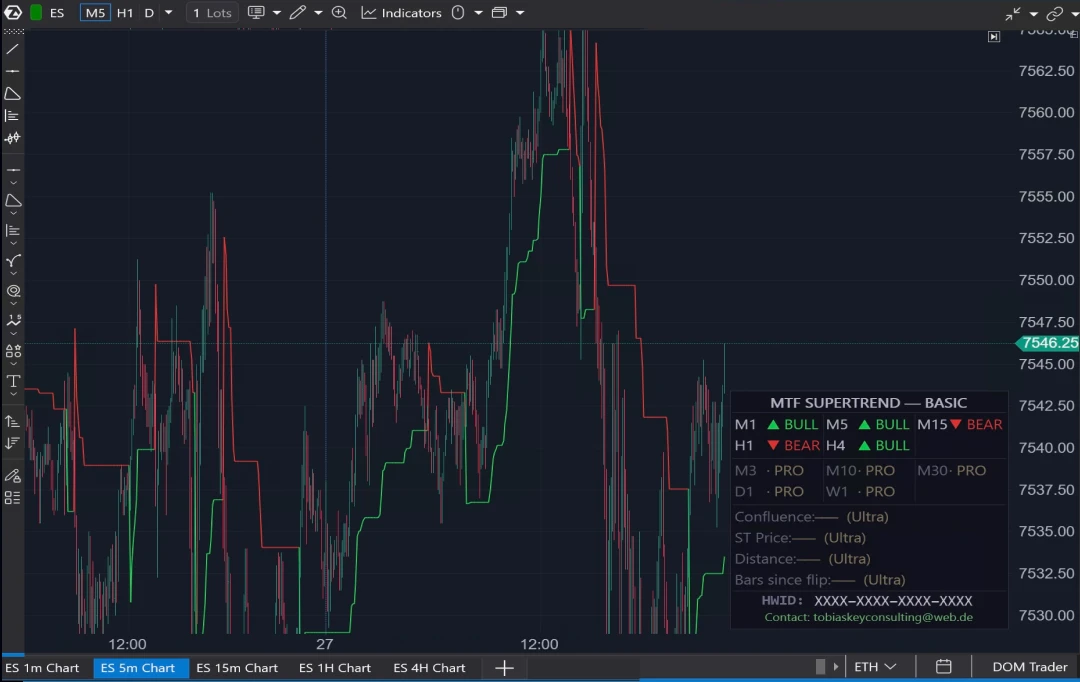
MTF Supertrend Basic is a trend-confirmation indicator for the ATAS analytical platform. It consolidates Supertrend direction readings from five timeframes — M1, M5, M15, H1 and H4 — into one compact panel. Traders can keep the bigger picture in view without switching between charts during active analysis. Basic is the permanently free tier of the MTF Supertrend product family.
Key Features
Five-timeframe panel in one chart
The indicator displays the Supertrend direction for M1, M5, M15, H1 and H4 on the chart currently in use.
Cross-instance registry
When the indicator is running on several charts of the same symbol, each instance shares the direction of its own timeframe via a common in-process panel. No external data connections are required.
No aggregation, no repainting
Each timeframe is calculated from its own native chart data, avoiding aggregation artifacts and preventing repainting when historical bars reload.
Supertrend line
The Supertrend band is drawn directly on the chart, colour-coded for bullish and bearish conditions and togglable on or off.
Lightweight overlay
The panel is compact and corner-positioned, remaining visible without distracting from chart work.
Built-in upgrade preview
The panel displays which additional timeframes and analytics are available in the Pro and Ultra tiers — M3, M10, M30, D1, W1, Confluence, Supertrend price, distance and bars since flip. In the Basic version, these features are greyed out. The panel also shows the hardware ID for a straightforward upgrade process. Basic itself does not require a license key and runs without restriction.
How It Works
The indicator calculates a standard Supertrend on each chart instance using ATR (default period: 10) multiplied by a configurable multiplier (default: 3.0) to build the trailing band. The resulting direction — BULL or BEAR — is published into a static in-process registry keyed by symbol and timeframe. A second render pass reads the registry and draws the consolidated panel.
To populate all five rows, load one indicator instance per timeframe. For example, open M1, M5, M15, H1 and H4 charts of the same symbol and apply the indicator to each. Once configured, each chart displays the full multi-timeframe view.
Configuration Parameters
| Parameter | Type | Default |
|---|---|---|
| ATR Period | Integer | 10 |
| Multiplier | Decimal | 3.0 |
| Show MTF Panel | Boolean | On |
| Show Supertrend Line | Boolean | On |
| Bullish Color | Color | Green |
| Bearish Color | Color | Red |
In the Basic tier, the five timeframes M1, M5, M15, H1 and H4 are fixed. Pro and Ultra tiers add configurable timeframe selection and additional readouts.
Analysis Scenarios
1. Scalping confirmation
A trader working on an M1 chart can check the panel before evaluating a potential setup. If M5 and M15 both show BULL, the setup has multi-timeframe directional alignment — context the trader can use to assess the strength of the configuration.
2. Session bias definition
Traders often use H1 or H4 direction to define their analytical bias for the session. Direction changes on M5 and M15 can then help refine the timing of analysis in the same direction.
3. Counter-trend context
If higher timeframes point in a different direction than M1, the trader can quickly identify a possible counter-trend situation and adjust analysis, expectations and position sizing accordingly.
4. Exit analysis
While monitoring an open position, traders may use an H1 direction flip as a data point to review stop placement or consider partial exits — without needing to monitor the H1 chart separately.
Pricing & Support
The Basic tier is permanently free for all ATAS users and does not require a license key. It serves as the entry point into the MTF Supertrend product family.
Pro and Ultra tiers add configurable timeframe selection and extended analytics, available directly from the developer's website. Pro and Ultra customers receive priority email support from the developer.
ToBeTheKey is an independent C# developer specialising in custom indicators and analytical tools for the ATAS platform. The developer creates multi-timeframe indicators, confluence-based analysis tools and custom indicator logic — both for personal use and on commission for other ATAS users. All indicators are developed from scratch in pure C#, without third-party dependencies. Paid tiers include a hardware-ID-based licensing system for customer protection. The focus is on clean code, rendering performance and close integration with the ATAS SDK. Every product is tested in live market conditions before release.